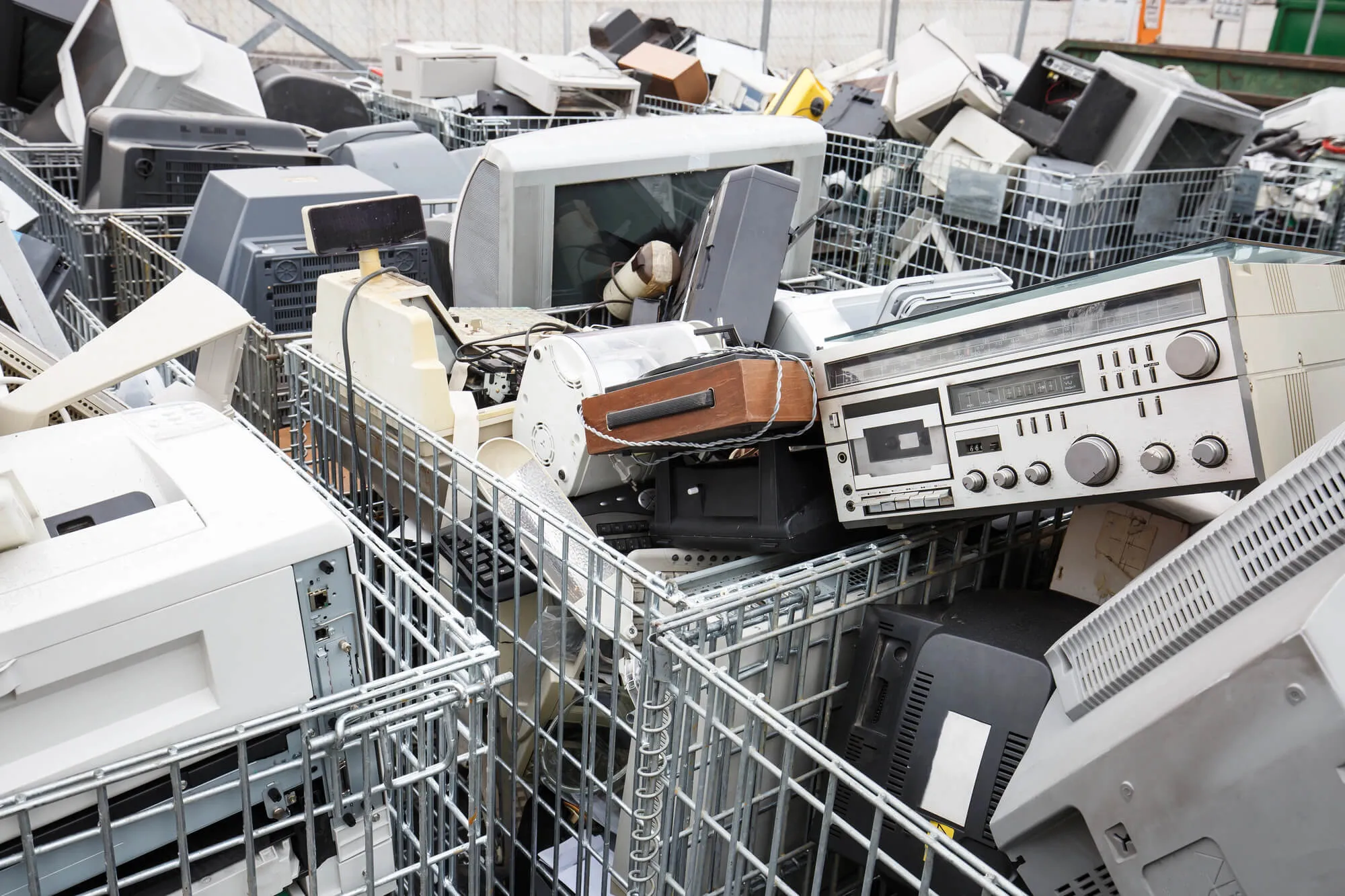
Electronics Disposal Guide: How to Dispose of and Recycle Old Computers, E-Waste, and Electronics Near Me the Right Way
After hauling away thousands of loads of old electronics waste, such as TVs and computers, from homes and businesses nationwide, we’ve seen firsthand how confusing e-waste disposal can be, and how often people unknowingly break local disposal laws or put hazardous materials into landfills simply because they didn’t know where else to turn.
We built this guide based on what our Jiffy Junk teams encounter on the job every day: the items people aren’t sure qualify as e-waste, the data security steps most folks skip, and the recycling and donation options that exist but rarely get explained in one place. Whether you want to handle disposal yourself or have our White Glove Treatment team pick everything up, recycle what we can, and donate what still has life left, you’ll find everything you need right here.
TL;DR: Quick Answers
What Is an Electronics Disposal Guide?
An electronics disposal guide is a step-by-step resource that explains how to safely recycle, donate, or dispose of old computers, phones, TVs, and other e-waste in compliance with local and federal regulations.
After disposing of thousands of gadgets nationwide, here’s what we’ve learned matters most:
- Know what counts as e-waste. Anything with a plug, battery, or circuit board, including items most people overlook, like power tools, baby monitors, and string lights
- Wipe your data first. Factory reset every device and remove SIM and SD cards before it leaves your home. This is the step most people skip
- Use a certified recycler. Look for R2 or e-Stewards certification to ensure they are handled responsibly, not shipped to an overseas landfill
- Separate batteries. Batteries in laptops, phones, and tablets often require separate recycling
- Donate what still works. Functional devices can go to schools, nonprofits, and community organizations
The biggest thing we tell every customer: the hardware problem isn’t a knowledge problem. It’s a convenience problem. Once you remove the logistics barrier, responsible disposal becomes the easy choice.
Top Takeaways
- Old electronics can’t go in the trash. Most devices contain lead, mercury, and lithium batteries. Disposing it curbside is illegal in many states and harmful everywhere. If it has a plug, battery, or circuit board.
- Wipe your data first. Sign out of accounts. Perform a factory reset. Remove SIM and SD cards. This is the step most people skip, and the one that matters most for protecting your identity.
- Choose a recycler with a certification. Not all recyclers handle them responsibly. Look for R2 or e-Stewards certification before handing over any device. The EPA, SERI, and e-Stewards directories make verification simple.
- Convenience is the real barrier and not awareness. Nearly two-thirds of U.S. electronics go unrecycled. Not because people don’t care. Because the process feels too complicated. Closing that gap starts with making responsible disposal easier.
- You don’t have to figure it out alone. Two clear paths forward: use the seven trusted resources in this guide to go the DIY route, or let Jiffy Junk’s White Glove Treatment team handle the pickup, recycling, and donation for you. Either way, responsible disposal is easier than most people think.
Table of Contents
- Electronics Disposal Guide: How to Dispose of and Recycle Old Computers, E-Waste, and Electronics Near Me the Right Way
- TL;DR: Quick Answers
- Top Takeaways
- What Counts as Digital Waste?
- Why You Can’t Just Throw Old Tech Away
- How to Protect Your Data Before Getting Rid of Old Devices
- Your Options for Recycling and Getting Rid of Old Tech
- Specialists With Certification for Recycling
- Donation
- Full-Service Pickup
- When to Call Jiffy Junk for Tech and Device Removal
- Essential Electronics Disposal Resources: 7 Trusted Tools to Help You Recycle E-Waste the Right Way
- 1. EPA Electronics Donation and Recycling Guide, Your Official Starting Point for E-Waste Disposal
- 2. EPA Certified Electronics Recyclers: How to Make Sure Your Recycler Meets National Safety Standards
- 3. SERI R2 Certified Facility Directory, Find a Responsible Recycler Near You
- 4. e-Stewards Find a Recycler – Locate Recyclers Held to the Highest Environmental Standards
- 5. Earth911 Recycling Search, The Fastest Way to Find a Local E-Waste Drop-Off
- 6. Call2Recycle Battery Drop-Off Locator, Safely Recycle the Batteries Inside Your Old Devices
- 7. FTC Consumer Guides to Wiping Personal Data, Protect Your Identity Before Any Device Leaves Your Home
- Supporting Statistics: What We See on the Job, Backed by the Numbers
- Final Thought: The E-Waste Problem Isn’t Going Away, But Solving It Doesn’t Have to Be Hard
- FAQ on “Electronics Disposal Guide”
- Ready to Dispose of Your Old Electronics the Right Way? Let Jiffy Junk Handle It.
What Counts as Digital Waste?
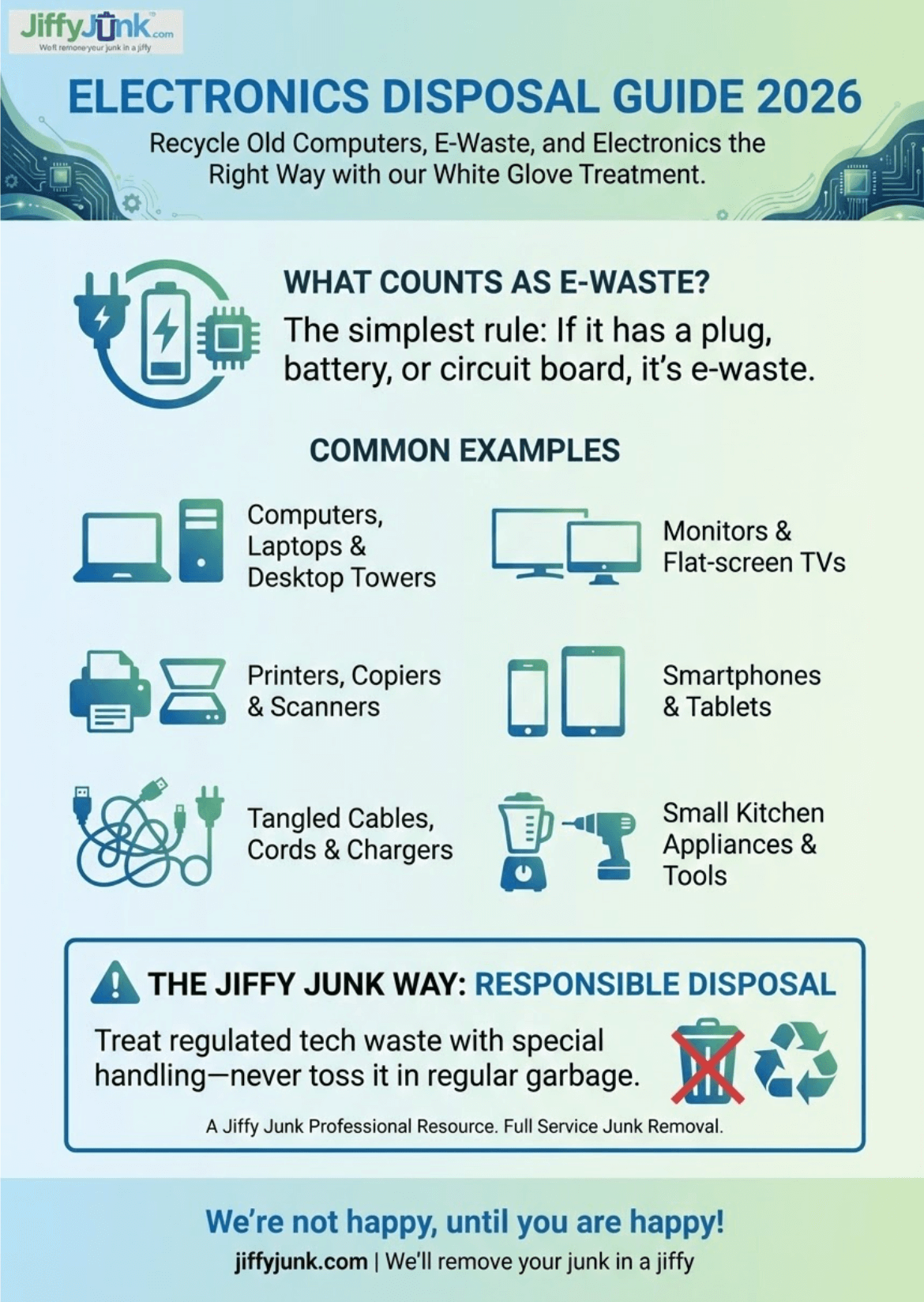
If it has a plug, battery, or circuit board, it most likely falls into this category. Based on what our teams pick up most often, here’s what we’re typically hauling away:
• Computers, laptops, and desktop towers
• Monitors and flat-screen TVs
• Printers, copiers, and scanners
• Smartphones and tablets
• Gaming consoles and controllers
• Tangled cables, cords, and chargers
• Routers, modems, and networking gear
• Small kitchen gadgets and countertop appliances
• Stereo systems and speakers
• Old or spent batteries of all sizes
Here’s the key thing we tell customers: if you’re not sure, it’s safer to treat it as regulated tech waste. Plenty of everyday items contain components like lithium-ion cells, lead solder, or mercury backlights that call for special handling. When in doubt, don’t toss it in with the regular garbage—and definitely don’t leave it sitting on the curb.
Why You Can’t Just Throw Old Tech Away
We’ve had customers who were genuinely surprised to learn that tossing a laptop in the garbage can actually lead to fines in many states. Most digital devices contain hazardous substances—lead, cadmium, mercury, and flame retardants among them—that seep into soil and groundwater once they wind up in landfills.
Beyond the environmental toll, there’s a practical concern our teams bring up with customers all the time: an old hard drive or phone that hasn’t been properly wiped still stores your personal information. Tax records, passwords, photos, banking details—we’ve seen people hand over devices without a second thought about what’s still sitting on them.
Responsible disposal and data security go hand in hand, and overlooking either one creates real risk for you and your family.
How to Protect Your Data Before Getting Rid of Old Devices
Before any device leaves your home, take a few minutes to safeguard your personal information. Our teams put together these steps based on what we’ve seen catch people off guard:
Back Up What You Need
Transfer important files, photos, and documents to cloud storage or an external drive before you do anything else. This is your safety net—don’t skip it.
Sign Out of All Accounts
Deauthorize streaming services, email accounts, and any apps tied to the device. This is the step most people forget, and it’s one of the most important.
Perform a Factory Reset
Use the device’s built-in reset function to wipe it back to its original settings. For computers, a full disk wipe using the operating system’s secure erase option provides stronger protection than a standard reset.
Remove Storage Media
Pull out memory cards, SIM cards, and external drives. For devices you’re especially cautious about, physically removing or destroying the hard drive is the most thorough option.
A Note for Businesses
If you’re clearing out equipment that handled sensitive client or company data, consider working with a certified data destruction service before scheduling a pickup. It’s an extra step that can save you a lot of headaches down the road.
Your Options for Recycling and Getting Rid of Old Tech
Not every situation calls for the same game plan. Here are the most common routes we see customers take—and honestly, each one has its place depending on what you’re working with.
Retailer Take-Back Programs
A lot of big-box stores will accept old devices for recycling, and some even offer trade-in credit toward something new. These programs work well for smaller gadgets you can carry in yourself—think phones, tablets, or a laptop you’ve been meaning to deal with.
Municipal Collection Events
Many cities and counties run periodic drop-off days specifically for outdated tech and digital equipment. Check your local waste authority’s website for upcoming dates. Fair warning, though—these events tend to fill up fast, so plan.
Specialists With Certification for Recycling
If you go this route, look for facilities carrying R2 or e-Stewards certification. That stamp matters because it guarantees the responsible processing of hazardous components. Not every recycler handles things like mercury or lead solder the way they should, so doing a little homework here goes a long way.
Donation
If a device still powers on and works, organizations like Goodwill, local schools, and community nonprofits are often glad to take it off your hands. Our teams donate qualifying items from every single job whenever we can—it’s a core part of how we operate, and frankly, one of our favorite parts of the work.
Full-Service Pickup
When you’ve got more than a carload, when the items are bulky or awkward to move, or when you simply don’t have time to haul everything to a drop-off site—that’s where we come in. We come to you, handle all the lifting and loading, and make sure every piece is recycled, donated, or disposed of the right way.
When to Call Jiffy Junk for Tech and Device Removal
From our experience handling pickups across the country, here are the situations where bringing in a professional crew makes the most sense:
• You’re clearing out an entire office full of outdated equipment—desktops, monitors, networking gear, the works.
• You’ve got large, heavy items like old projection TVs, server racks, or bulky CRT monitors that aren’t easy to wrestle out on your own.
• You’re managing an estate cleanout, and there are appliances and devices mixed in with everything else.
• You just want the peace of mind that comes with knowing a fully licensed and insured team is handling your items—and prioritizing eco-friendly disposal every step of the way.
We take care of the sorting, the heavy lifting, and the responsible disposal—so you don’t have to spend your weekend figuring out which items go where. Just point to what needs to go, and our White Glove Treatment team handles the rest.
“After removing thousands of loads of old electronics from homes and businesses, the biggest thing we’ve learned is that most people want to do the right thing with their e-waste. They just don’t know where to start. That’s exactly why we built our process around making responsible disposal the easiest option, not the last resort.” — Jiffy Junk Team
Essential Electronics Disposal Resources: 7 Trusted Tools to Help You Recycle E-Waste the Right Way
We believe responsible disposal should be easy, not stressful. Whether you’re tackling a technology cleanout on your own or letting our team handle the heavy lifting, these seven trusted resources will help you find certified recyclers, protect your personal data, and stay on the right side of your state’s e-waste laws.
1. EPA Electronics Donation and Recycling Guide, Your Official Starting Point for E-Waste Disposal
Not sure where to begin? You’re not alone. It’s one of the most common questions our teams hear on the job. The U.S. Environmental Protection Agency’s central resource walks you through every disposal option available, from manufacturer take-back programs to local collection events, so you can choose the path that fits your situation.
Best for: First-time disposers, homeowners, and anyone looking for a clear overview of all available options.
Source: epa.gov/recycle/electronics-donation-and-recycling
2. EPA Certified Electronics Recyclers: How to Make Sure Your Recycler Meets National Safety Standards
Here’s something we tell every customer: not every company that calls itself a recycler handles them responsibly. This EPA page explains the two accredited certification standards in the U.S. R2 and e-Stewards. Why choosing a certified facility protects you, your data, and the environment. It’s a quick read that can save you from a costly mistake.
Best for: Anyone vetting a recycler before handing over old gadgets, especially devices that may contain sensitive data.
Source: epa.gov/electronics-batteries-management/certified-electronics-recyclers
3. SERI R2 Certified Facility Directory, Find a Responsible Recycler Near You
Looking for a recycler you can actually trust? Sustainable Electronics Recycling International (SERI) maintains the official searchable directory of every R2-certified facility worldwide. R2 is the most widely adopted electronics recycling standard, covering environmental management, data destruction, worker safety, and downstream accountability, the same standards we look for in our own disposal partners.
Best for: Businesses and individuals who need to locate a vetted recycler that is certified in their area with verified data security practices.
Source: sustainableelectronics.org/find-an-r2-certified-facility
4. e-Stewards Find a Recycler – Locate Recyclers Held to the Highest Environmental Standards
If eco-friendly disposal is a priority for you, it’s always a priority for us. This is the directory to bookmark. The e-Stewards certification program, created by the Basel Action Network, sets the highest bar for responsible electronics recycling, including a strict ban on exporting hazardous trash to developing countries. Their directory connects you with certified processors and collectors committed to ethical, environmentally sound practices.
Best for: Environmentally conscious consumers and organizations that want assurance their waste won’t end up in overseas landfills or unregulated facilities.
Source: e-stewards.org/find-a-recycler
5. Earth911 Recycling Search, The Fastest Way to Find a Local E-Waste Drop-Off
Need a drop-off location fast? Earth911 maintains one of North America’s largest recycling databases, with over 100,000 listings covering more than 350 materials. Just enter your zip code and item type, and you’ll see nearby drop-off locations, collection events, and mail-in recycling programs in seconds. It’s the quickest way to find an option close to home when you’re ready to clear out old electronics.
Best for: Anyone who wants to quickly find the nearest trash drop-off point without spending hours on research.
Source: search.earth911.com
6. Call2Recycle Battery Drop-Off Locator, Safely Recycle the Batteries Inside Your Old Devices
Here’s a detail our teams flag on nearly every electronics job: the batteries inside your old laptops, tablets, phones, and power tools often need to be recycled separately from the device itself. Call2Recycle operates the largest consumer battery collection program in the U.S. and Canada, with thousands of free public drop-off sites at major retailers and community locations. It takes just a minute to find your nearest one.
Best for: Anyone disposing of battery-powered devices who needs to handle the component safely and legally.
Source: call2recycle.org/locator
7. FTC Consumer Guides to Wiping Personal Data, Protect Your Identity Before Any Device Leaves Your Home
This is the step we see people skip most often, and it’s the one that matters most. The Federal Trade Commission provides clear, step-by-step instructions for removing personal information from computers and phones before you recycle, sell, or donate them. From backing up files and signing out of accounts to performing a full factory reset, these guides cover exactly what to do and what most people forget.
Best for: Anyone getting rid of a computer, laptop, tablet, or phone that has ever stored personal information, passwords, financial data, or photos.
Source: consumer.ftc.gov/articles/how-remove-your-personal-information-you-get-rid-your-computer
Rather skip the research and let someone handle it for you? That’s exactly what we’re here for. Our fully licensed and insured teams will pick up your old electronics, recycle and donate what we can, and leave you with nothing but clutter-free space. No sorting, no drop-off trips, no guesswork, just our professional treatment from start to finish.
Supporting Statistics: What We See on the Job, Backed by the Numbers
After years of removing electronics from homes, offices, and storage units across the country, our teams know exactly how Americans handle their old devices. Here’s what the data confirms about the patterns we encounter every day.
1. The Average American Home Has More Old Devices Than Most People Realize
Walk into almost any cleanout we handle, and you’ll find the same thing: old phones in a kitchen drawer, a retired laptop in a closet, a printer no one’s touched in years, and a tangle of cables that hasn’t been opened since the last move.
The numbers back it up:
- Americans currently own more than 3 billion electronic products
- The average household has 24 devices
- E-waste is now the fastest-growing component of the municipal waste stream in the U.S.
What we see on the job: Customers almost always underestimate how much they have. Once we start clearing one area, they find more in other rooms, closets, and storage spaces they’d forgotten about. The accumulation happens quietly until it feels overwhelming.
Source: U.S. Environmental Protection Agency, Helping Communities Manage Electronic Waste
2. Your Old Devices Are Worth More Than You Think
What looks like a pile of outdated junk is actually a significant source of recoverable materials. According to the EPA, recycling one million cell phones recovers:
- 35,000 pounds of copper
- 772 pounds of silver
- 75 pounds of gold
- 33 pounds of palladium
The U.S. Geological Survey confirms the stakes, noting that when large numbers of cell phones become obsolete, large quantities of valuable metals end up either in storage or in landfills. USGS
What we see on the job: A single office cleanout can yield dozens of old towers, monitors, and phones. Each contains small but meaningful amounts of precious metals and reusable components. One device doesn’t seem like much. A full truckload after an electronics removal? The combined recovery potential is substantial. That’s why recycling and donation aren’t an afterthought for us. They’re built into every job.
Source: U.S. Environmental Protection Agency, Electronics Donation and Recycling
3. Most Old Electronics Never Get Recycled and We See Exactly Why
A U.S. Government Accountability Office report found that approximately 2.8 million tons of consumer trash were disposed of in the U.S. in 2017 and only about 36 percent were recycled. That means nearly two-thirds went unrecycled. The GAO also found that hardware recycling is complex and faces challenges, such as a lack of profitability, which helps explain why convenient, consumer-friendly recycling options haven’t kept pace with demand.
What we see on the job: The gap isn’t a motivation problem; it’s a convenience problem. Our customers almost always want to do the right thing.
Our cleaning professionals handle the sorting, the heavy lifting, and the responsible disposal so that it would otherwise sit untouched, actually get recycled the right way.
Source: U.S. Government Accountability Office, Science & Tech Spotlight: Consumer Electronics Recycling
Final Thought: The E-Waste Problem Isn’t Going Away, But Solving It Doesn’t Have to Be Hard
After removing thousands of loads of old gadgets from homes and businesses across the country, we’ve come to a simple conclusion: the e-waste problem in America isn’t a knowledge problem, and it isn’t an apathy problem. It’s a friction problem.
The information is out there. The EPA, USGS, GAO, and dozens of certified recycling organizations have made it clear what’s at stake:
- Billions of dollars in recoverable materials are going to landfills
- Hazardous substances leaching into soil and groundwater
- A waste stream growing faster than any other category in the country
Most people we work with already know old devices shouldn’t go in the trash. They know recycling matters. They know their data needs to be wiped. What they don’t have is an uncomplicated path from knowing to doing.
What We See on Every Job
That gap between intention and action shows up on every single pickup we handle:
- The homeowner who’s had a pile of old laptops in the garage for three years, not because they didn’t care, but because the recycling center is across town, and the whole thing kept falling to the bottom of the weekend list
- The business owner is sitting in a storage room full of outdated equipment because coordinating certified disposal felt like a project requiring more time than they had
- The family handling an estate cleanout who’s already emotionally drained and can’t take on the mental load of sorting them from everything else
How We Put That Philosophy Into Practice
That’s the thinking behind everything we do:
- We show up at your door. No trips to the drop-off center required.
- We do all the heavy lifting. You don’t load a single thing into your car.
- We sort what can be recycled. Items that still have life get donated.
- We handle the rest responsibly. Everything is disposed of the right way.
You just point to what needs to go. We take care of everything else, with the same White Glove Treatment we bring to every job.
FAQ on “Electronics Disposal Guide”
Q: What qualifies as e-waste?
A: The simplest rule we give customers on every job: if it has a plug, battery, or circuit board, treat it as e-waste.
Common items include:
- Computers, laptops, and monitors
- TVs, printers, and scanners
- Phones, tablets, and gaming consoles
- Cables, chargers, and routers
- Small kitchen electronics
Items that surprise most people we work with:
- Electric toothbrushes and shavers
- Old baby monitors and walkie-talkies
- Broken power tools
- Holiday string lights
Q: Is it illegal to throw old electronics in the garbage?
A: In many parts of the country, yes. It’s a question we get on nearly every job.
Here’s what to know:
- 25 states plus Washington, D.C. have enacted specific e-waste disposal laws
- Penalties for improper disposal can include fines that catch people off guard
- Even in states without dedicated legislation, electronics contain lead, mercury, and cadmium that damage soil and groundwater when landfilled
Q: How do I make sure my personal data is safe before disposing of a device?
A: This is the single most overlooked step we encounter in the field. We’ve watched customers hand over old laptops, phones, and even office printers without thinking twice about what’s still stored on them — tax documents, saved passwords, banking apps, family photos, client records.
Q: What’s the difference between R2 and e-Stewards certified recyclers?
A: We get this question from customers who’ve done some research and found two main certifications, but aren’t sure which to look for. The EPA recommends both. They are responsible for handling. The difference is scope and strictness.
R2 (Responsible Recycling):
- Managed by SERI — the most widely adopted standard worldwide
- Covers environmental practices, data security, worker safety, and downstream accountability
- Ensures the recycler is responsible for your electronics at every stage of processing
e-Stewards:
- Created by the Basel Action Network, the strictest environmental standard
- Includes a complete prohibition on exporting hazardous e-waste to developing countries
- The certification we point customers to first when eco-friendly disposal is their top priority
Either certification is a meaningful benchmark. These are the same standards we reference when evaluating our own disposal partners.
Q: Can Jiffy Junk pick up and recycle my old electronics for me?
A: It’s one of the most common jobs we handle — and one of the most satisfying, because the transformation happens fast.
What we pick up:
- Computers, laptops, monitors, and TVs
- Printers, phones, cables, and appliances
- Just about any electronic device — directly from your home or business
We built this process because after thousands of electronics pickups, we saw the same pattern: good people with good intentions sitting on piles of old devices for years because disposal felt too complicated. We decided to make it simple. That’s our White Glove Treatment.
Ready to Dispose of Your Old Electronics the Right Way? Let Jiffy Junk Handle It.
Skip the research, the sorting, and the drop-off trips. Our White Glove Treatment team picks up your old computers, e-waste, and electronics, recycles and donates what we can, and leaves you with nothing but clutter-free space. Book your pickup today at jiffyjunk.com/booking or call 844-JIFFY-JUNK.