How to Get Rid of an Old Computer or Laptop: Data Wiping, Free E-Waste Recycling, Donation, and When to Schedule a Pickup
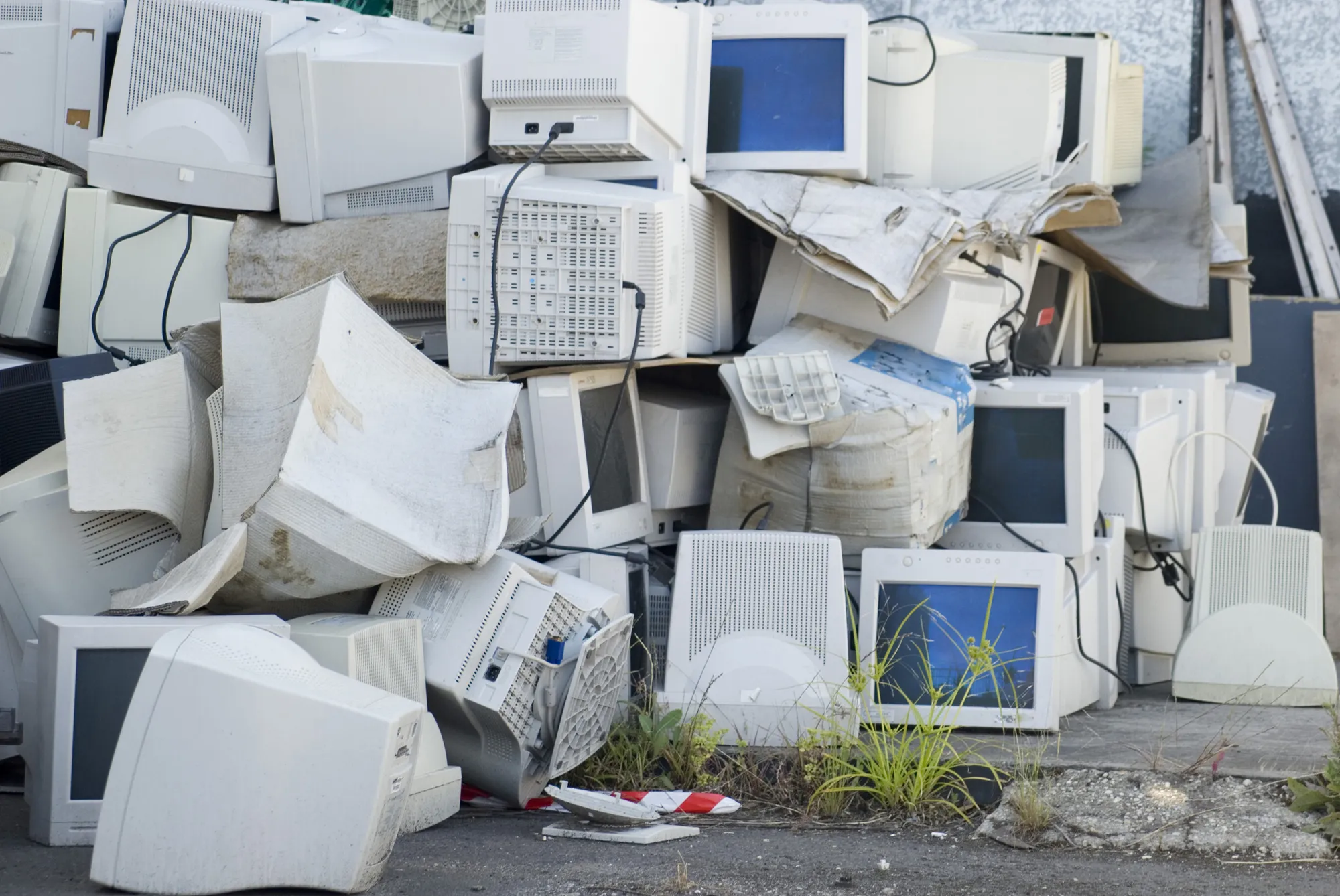
Our crews see the same scene every week: a basement corner with three old laptops, a CRT monitor heavy enough to throw out a back, and a desktop tower no one has powered on since 2014. The pile keeps growing. Getting rid of an old computer is straightforward once you sort it into four paths and handle the one step that has to come first. This guide walks you through every option, plus the easiest way to clear a stack at once.
TL;DR Quick Answer
How to Get Rid of an Old Computer or Laptop
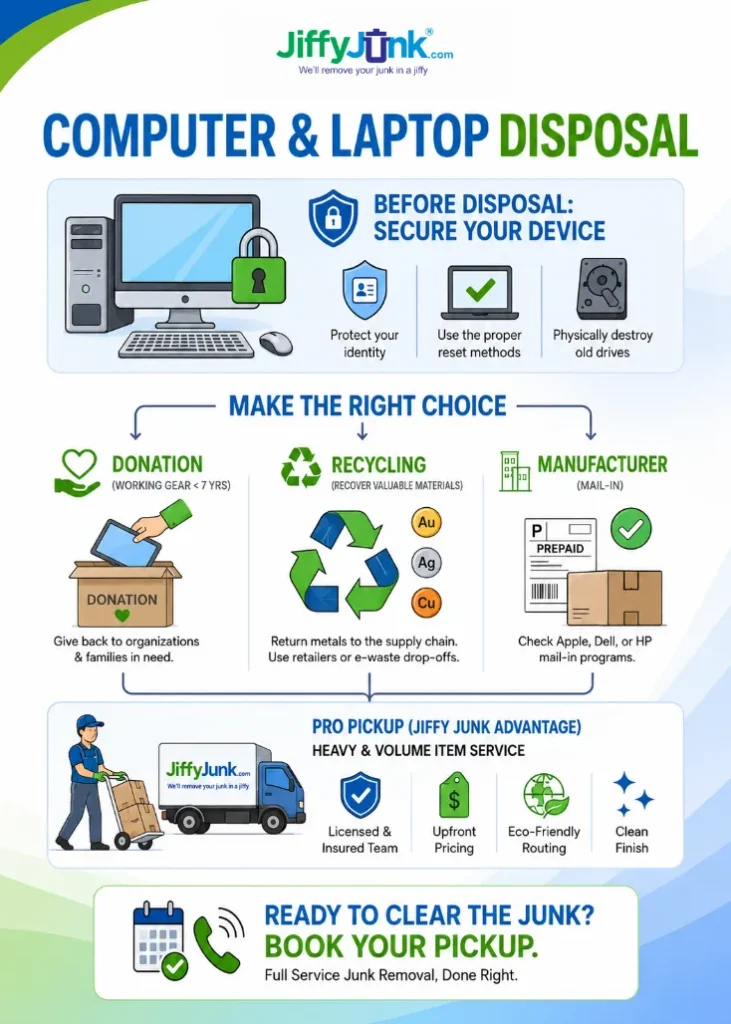
Back up the files you want to keep. Wipe the hard drive using your computer’s built-in reset tool (Windows: Settings > Recovery > Reset This PC > Clean data. Mac: System Settings > General > Transfer or Reset > Erase All Content and Settings). After the device is wiped, pick one of four paths: drop it off for free at Best Buy or Staples, donate it to a nonprofit like Goodwill or PCs for People if it still works, mail it back through the manufacturer’s trade-in program, or schedule a pickup so a licensed team handles every step, including the heavy lifting and eco-friendly recycling.
Wipe Your Data First
Dragging files to the trash leaves them recoverable. Any free recovery tool can pull them back. Use Windows Reset, macOS Erase All Content, or a wipe tool like DBAN on older machines.
Pick the Right Path for the Device
Working computer under seven years old: donate to Goodwill, PCs for People, World Computer Exchange, or a local school program. Working computer over seven years old or broken: drop off at Best Buy or Staples, or mail through Apple Trade In, Dell Reconnect, HP, or Microsoft. CRT monitor, multiple machines, or a whole-household clear-out: book a Jiffy Junk pickup.
Or Skip the Sorting
Call Jiffy Junk. Our crew handles wipe verification on request, the haul-out, and eco-friendly recycling. Pricing is volume-based and quoted up front. Book online at jiffyjunk.com/booking or call 844-543-3966.
Top 5 Takeaways
1. Wipe Before You Walk Out. Deleting files leaves them recoverable. Run a full reset on Windows or macOS, or pull the drive on an older machine and have it shredded.
2. You Have Four Paths After the Wipe. Free drop-off, donation, manufacturer mail-in, or a professional pickup. The right one depends on the device’s condition and how many items you’re handling.
3. Best Buy and Staples Take Most Computers for Free. Both run free in-store drop-off for desktops, laptops, tablets, and accessories. CRT monitors and older TVs may carry a small fee at Best Buy.
4. Donation Extends a Working Machine’s Life. Nonprofits like Goodwill, PCs for People, and World Computer Exchange refurbish working laptops and desktops for students, low-income families, and community programs.
5. Pickup Is the Easiest Path for Stacks, CRTs, and Clear-Outs. Jiffy Junk’s licensed crew loads everything, hauls it, and routes it to certified e-waste recyclers, plus donation partners for working units.
Table of Contents
- How to Get Rid of an Old Computer or Laptop: Data Wiping, Free E-Waste Recycling, Donation, and When to Schedule a Pickup
- TL;DR Quick Answer
- Wipe Your Data First
- Top 5 Takeaways
- Step One: Wipe Your Data Before Anything Else Leaves Your Hands
- Step Two: Choose the Path That Fits the Device and the Job
- When to Skip Drop-Off and Schedule a White Glove Pickup
- Seven Essential Resources for Old Computer Disposal
- 1. Electronics Donation and Recycling Overview (U.S. EPA)
- 2. How to Remove Personal Information Before Disposal (FTC)
- 3. NIST SP 800-88 Rev. 2 Media Sanitization Guidelines (NIST)
- 4. What to Recycle: Battery Drop-Off Network (The Battery Network)
- 5. The Importance of Certified Electronics Recycling (e-Stewards)
- 6. Laptop and Desktop Computer Recycling (PCs for People)
- 7. How to Donate Computers (World Computer Exchange)
- Three Statistics That Put the Stakes in Perspective
- The Final Word on Getting Rid of an Old Computer
- Frequently Asked Questions
- Q: How Do I Permanently Wipe a Computer Before Disposal?
- Q: Will Best Buy Really Take My Old Computer for Free?
- Q: Can I Donate a Slow or Older Laptop That Still Works?
- Q: Do I Need to Physically Destroy My Hard Drive?
- Q: How Much Does a Jiffy Junk Computer Pickup Cost?
- Q: What Computer Components Can Jiffy Junk Pick Up?
- Q: What Happens to My Computer After Pickup?
- Q: Is It Illegal to Throw Away an Old Computer?
- Schedule a Computer Pickup With Jiffy Junk Today
Step One: Wipe Your Data Before Anything Else Leaves Your Hands
Deleting files does not erase them. The Federal Trade Commission’s guide on removing personal information before disposal confirms that recovery tools, often free, can read deleted files long after you have emptied the trash bin. Identity theft hit 23.9 million Americans in 2021, with $16.4 billion in total losses, according to the Bureau of Justice Statistics. The fraud becomes far easier when a hard drive walks out the door with passwords, tax records, and bank statements still on it. For more on why a quick wipe is the single biggest reason to handle disposal carefully, see our deeper take on computer recycling and the data dump risk.
Wipe the drive before the machine leaves your home. The U.S. National Institute of Standards and Technology publishes the standard most secure recyclers, and IT teams follow: NIST SP 800-88 Rev. 2 on media sanitization. The point is simple: a proper wipe writes over the data so nothing readable remains.
Here is how to do it on common operating systems:
Windows 10 or 11: Settings > System > Recovery > Reset this PC > Remove everything > Clean data. Allow one to three hours.
Mac (2018 or Newer): System Settings > General > Transfer or Reset > Erase All Content and Settings. Allow 30 to 90 minutes.
Older Devices: Boot into Recovery Mode on Mac, or use DBAN on Windows. For a computer that no longer powers on, remove the hard drive and physically destroy it.
For a deeper background on the practice itself, Wikipedia has a solid overview of computer recycling, which covers everything from data destruction to material recovery.
Step Two: Choose the Path That Fits the Device and the Job
After the wipe, every path below is legal, secure, and better than the curb. The right one depends on the device’s condition and how much work you want to do.
1. Free Drop-Off at Best Buy, Staples, or a Municipal Event
Best Buy accepts most desktops, laptops, tablets, and small electronics at its in-store Tech Drop-Off counter at no cost. Staples runs free drop-off for laptops and small electronics at its tech recycling counters. Both options work well for clean, wiped machines you can carry to a store. Most cities and counties also host periodic e-waste collection events, which is the right choice for one or two devices when you’re already running errands.
2. Donation: If It Still Works
A working laptop or desktop under seven years old has years of useful life left in another household. Goodwill accepts working electronics at most locations. PCs for People takes working desktops and laptops and refurbishes them for low-income families and nonprofits. World Computer Exchange accepts working laptops less than seven years old and desktops that still boot, for distribution to students and schools.
3. Manufacturer Mail-In and Trade-In Programs
Apple Trade In, Dell Reconnect, HP Trade-In, and Microsoft Trade-In all provide free prepaid shipping labels for retired devices, including units with no trade-in value. Print the label, box up the machine, and drop it off at your shipping carrier. This is the simplest path for a single laptop you would rather hand off without leaving home. For a fuller walkthrough of manufacturer trade-in programs and other earth-conscious paths, see our guide to disposing of computers conscientiously.
4. Professional Pickup
Several devices, broken hardware, CRT monitors, or a basement clean-out shift the math. A pickup turns a multi-stop, multi-hour project into one scheduled appointment. Jiffy Junk’s licensed and insured Computer Recycling Pickup service handles desktops, laptops, all-in-ones, workstations, printers, and monitors, and routes everything to certified recyclers and donation partners. Pricing is volume-based and quoted up front before any work begins.
When to Skip Drop-Off and Schedule a White Glove Pickup
There comes a point where loading a 90-pound CRT into a sedan, packing fragile laptops for shipping, or driving to three different recyclers stops feeling free. A pickup pays for itself in those situations.
A few signs to book one:
Several Devices on Hand. A desktop, a laptop or two, a printer, and a monitor add up quickly.
A Computer No Longer Powers On. Drop-off counters typically require you to verify the wipe yourself, which is impossible on a dead machine. Shipping a non-working laptop is awkward, too.
An Old CRT Monitor or TV. These are heavy, contain lead, and may incur small fees at retail drop-off. A pickup crew handles them safely.
Clearing an Office, an Estate, or a Basement. Sorting working from broken, then routing each to the right place, becomes its own project.
Our team books pickups across the country. Two crew members load every item, wipe-eligible drives get verified or destroyed on request, and everything else routes to certified recyclers or donation partners. The White Glove Treatment means no item gets dragged across your floor, no debris stays behind, and you keep your weekend.
Schedule online or call 844-543-3966 for a quote.
“After more than a decade of computer pickups, the single biggest mistake we see is people assuming a deleted file is a gone file. It isn’t. Wipe the drive before it leaves your home, and you’ve already done the hardest part right.”
— Jiffy Junk Operations Team
Seven Essential Resources for Old Computer Disposal
Each link below opens a primary source: federal guidance, recognized nonprofits, or industry-standard documentation.
1. Electronics Donation and Recycling Overview (U.S. EPA)
The EPA’s official portal for electronics donation and recycling, with state-level locator tools and certified recycler directories.
Source: Electronics Donation and Recycling | US EPA
2. How to Remove Personal Information Before Disposal (FTC)
The Federal Trade Commission’s step-by-step guide on data wiping for both PC and Mac, with practical advice for shared and family computers.
3. NIST SP 800-88 Rev. 2 Media Sanitization Guidelines (NIST)
The federal standard most certified data destruction services follow, and the reference that any IT department or compliance officer will recognize.
Source: SP 800-88 Rev. 2 (Final) – Guidelines for Media Sanitization | NIST
4. What to Recycle: Battery Drop-Off Network (The Battery Network)
The nationwide network for safely recycling rechargeable and lithium-ion batteries pulled from old laptops and devices, formerly known as Call2Recycle.
Source: What to Recycle | The Battery Network
5. The Importance of Certified Electronics Recycling (e-Stewards)
An explanation of the e-Stewards certification, a recognized mark for verifying that an electronics recycler is responsible and ethical.
Source: The Importance of Certified Electronics Recycling | e-Stewards
6. Laptop and Desktop Computer Recycling (PCs for People)
A nonprofit refurbisher that accepts working laptops and desktops, then routes them to families and nonprofits at low or no cost.
Source: Laptop and Desktop Computer Recycling | PCs for People
7. How to Donate Computers (World Computer Exchange)
A nonprofit that ships working laptops and desktops to students and schools, with a free shipping label option for individual donors.
Source: How to Donate Computers | World Computer Exchange
Three Statistics That Put the Stakes in Perspective
1. 25 States Plus DC Now Regulate Electronic Waste
Per the National Conference of State Legislatures, 25 U.S. states plus the District of Columbia have passed laws governing electronics recycling and disposal, with most requiring manufacturers to fund collection. The EPA confirms the same count of state-level e-waste laws across the country, which means putting a computer out with regular household pickup is illegal in roughly half the states.
Source: National Conference of State Legislatures
2. 23.9 Million Americans Hit by Identity Theft in 2021
The U.S. Bureau of Justice Statistics reports that 23.9 million Americans were victims of identity theft in 2021, with total losses of $16.4 billion. Drive-resident data on a discarded computer is a common vector. A complete wipe before disposal is the single most direct way to reduce that risk.
Source: U.S. Bureau of Justice Statistics
3. Computers Are a Top Source of Recoverable Precious Metals
The U.S. Geological Survey Recycling Statistics track the recovery of valuable metals from end-of-life electronics, including gold, silver, copper, and palladium. The published data shows that responsible recovery returns these materials to manufacturing supply chains, which means each properly recycled computer reduces virgin mining demand.
Source: U.S. Geological Survey Recycling Statistics

The Final Word on Getting Rid of an Old Computer
Here’s the honest version, after years of clearing closets, basements, and home offices: the hardest part isn’t the disposal. It’s the decision. People keep old laptops because they’re full of data they aren’t sure how to remove it safely. Once the wipe is done, the rest is logistics.
Pick the path that matches your situation:
- One working laptop under seven years old: donate it. A refurbished machine in the hands of a student or a low-income family does more good than a $30 trade-in credit ever could.
- One non-working device or older machine: free drop-off at Best Buy, Staples, or the manufacturer’s mail-in program is the easiest free option, and you may pocket some store credit on your way out.
- Several devices, a CRT monitor, or a basement that has become a graveyard: book a pickup. The math on free drop-off stops working once you’re loading lead-filled CRTs into a sedan or making three separate trips.
Want the broader view that covers TVs, phones, printers, and every other piece of electronics in the house? Read our full Electronics Disposal Guide, a complete sibling article that walks through every category of e-waste with the same step-by-step framework.
Frequently Asked Questions
Q: How Do I Permanently Wipe a Computer Before Disposal?
A: Back up anything you want to keep. Use the built-in reset tool: Settings > System > Recovery > Reset This PC > Remove Everything > Clean Data on Windows 10 or 11; System Settings > General > Transfer or Reset > Erase All Content and Settings on a modern Mac. For older machines or hardware that no longer powers on, remove the drive and have it physically destroyed by a certified data destruction service.
Q: Will Best Buy Really Take My Old Computer for Free?
A: Yes. Best Buy accepts most desktops, laptops, tablets, cell phones, and accessories for free at its in-store Tech Drop-Off counter. CRT monitors, TVs over a certain size, and some appliances may carry a fee. Check the Best Buy recycling page or call your local store to confirm before you load up the car.
Q: Can I Donate a Slow or Older Laptop That Still Works?
A: Yes, in many cases. Goodwill, PCs for People, World Computer Exchange, and local school programs accept working laptops, typically less than seven years old. The machine may feel too slow for your daily use, and still be plenty useful for a student doing homework or a family without a primary computer.
Q: Do I Need to Physically Destroy My Hard Drive?
A: For most households, a full software wipe is enough. For regulated data, including medical practice records, legal client files, tax preparer files, or anything covered by HIPAA, GLBA, or similar rules, remove the drive and have it physically destroyed by a certified service. NIST SP 800-88 Rev. 2 is the standard most professional providers follow.
Q: How Much Does a Jiffy Junk Computer Pickup Cost?
A: Pricing is volume-based and quoted up front, before any work begins. The price you’re quoted is the price you pay. Smaller jobs (a few laptops and a printer) cost less than full-room or full-basement clear-outs. Use the online estimator at jiffyjunk.com/booking or call 844-543-3966 for a same-day quote.
Q: What Computer Components Can Jiffy Junk Pick Up?
A: Desktops, laptops, all-in-ones, monitors (including CRTs), keyboards, mice, printers, cables, external hard drives, networking gear, and most peripherals. We also handle adjacent electronics like TVs, microwaves, stereos, and small appliances in the same visit, which is useful for whole-room or whole-house clear-outs.
Q: What Happens to My Computer After Pickup?
A: We route working devices to donation partners when their condition allows. Everything else goes to certified e-waste recyclers, who recover metals, plastics, and glass, and divert the rest from landfills. We can wipe or physically destroy hard drives on request, and we provide documentation for both.
Q: Is It Illegal to Throw Away an Old Computer?
A: It depends on the state. 25 states and the District of Columbia regulate electronics disposal, and many ban computers, monitors, and TVs from household waste streams. California, New York, and Illinois carry the strictest rules. Even where it remains legal, putting a computer out with regular pickup wastes recoverable materials and risks releasing lead, mercury, and cadmium into the ground.
Schedule a Computer Pickup With Jiffy Junk Today
Sorting, working from broken, driving to three recyclers, packing a CRT monitor that weighs more than your dog: most days, none of that is the best use of a Saturday. Our licensed and insured team handles every step, from carrying the device out of the basement to dropping it at a certified e-waste recycler.
We work with full transparency: a volume-based quote up front, on-time crews, and no debris left behind. That’s the White Glove Treatment.
We’re not happy until you are happy. Book online at jiffyjunk.com/booking, or call 844-543-3966 for a quote. Full Service Junk Removal, Done Right.